
Copy of Usage Guide
<Table of Contents>
1. How to Purchase Products
2. How to Use Tickets
3. How to Distribute Tickets
4. How to Use Live and Streaming Distribution
1. How to Purchase Products
① Find the desired product in the store

② After deciding on the product, proceed to checkout

③ Enter billing address and payment information
* If you have a coupon code, please enter it on this screen.

④ Purchase complete!
* Upon completion of your purchase, a purchase confirmation email will be sent to the email address registered to your account.

2. How to Use Tickets
* Tickets cannot be used on a PC. We recommend using them on a smartphone.
① Tap the person icon in the upper right corner of the screen to log in to My Page

② Tap "View Ticket" from "View Order Details"
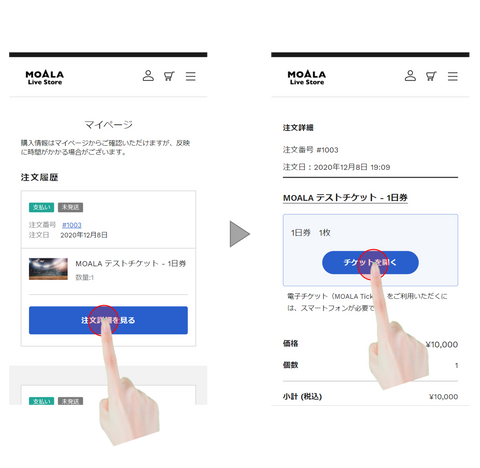
③ Present your ticket at the event venue for admission

3. How to Distribute Tickets
* Some products may not be set up for distribution.
① Tap "Distribute" on the ticket face

② Tap "Distribute"

③ Select a method to distribute the ticket

④ Send tickets via various SNS or email
Click here for the recommended operating environment for e-tickets
Product Orders and Contract Formation, etc.
・You shall order the products and services provided by our site in accordance with the methods specified on this site. Your order shall be confirmed when we send an order confirmation email to the email address you specified from this site. After the order is confirmed, you cannot change or cancel the order due to your convenience.
・If your application does not reach our server due to an internet failure or other reasons, the order will not be confirmed.
・The sales contract between you and us shall be formed for each product when the email notifying you of the product's shipment arrives at your specified email address. However, if you cannot confirm the arrival of said email, it shall be when we change the status to "Shipped" on the order history/delivery status screen on this site.
・Ownership of the products shall be transferred to you when the products are delivered to you.
Refunds, Exchanges, etc.
Shipping and Handling
Other Notes
・The color and shape of products may differ from what is displayed on the screen and the actual product.
・If there is a discrepancy between the image, description, or notation of a product and its current state, the current state shall take precedence.
・Except in cases of willful misconduct or gross negligence, we shall not be liable for any damages, losses, or disadvantages related to products sold on this site, regardless of the legal cause of action, beyond what is stipulated in these terms of use, each policy, and product information.
Product Orders and Contract Formation, etc.
・You shall order the products and services provided by our site in accordance with the methods specified on this site. Your order shall be confirmed when we send an order confirmation email to the email address you specified from this site. After the order is confirmed, you cannot change or cancel the order due to your convenience.
・If your application does not reach our server due to an internet failure or other reasons, the order will not be confirmed.
・The sales contract between you and us shall be formed upon completion of payment.
Recommended Operating Environment for E-Tickets
4. How to Use Live and Streaming Distribution
① Tap the person icon in the upper right corner of the screen to log in to My Page
② Tap "Watch" from "View Order Details"
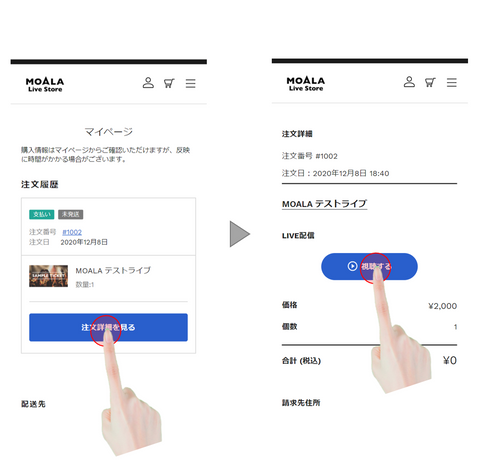
③ Start watching the content
